Overview
GraphQL::Pro::OperationStore uses Rack and a storage backend (ActiveRecord or Redis) to maintain a normalized, deduplicated database of persisted queries for your GraphQL system.
In this guide, you’ll find:
-
The rationale behind them
-
How
OperationStoreworks, in brief
In other guides, you can read more about:
-
Getting Started installing
OperationStorein your app -
Workflow and usage for client apps
-
Authentication for the sync API
-
Server Management after your system is running
Also, you can find a demo app on GitHub.
What are Persisted Queries?
Persisted queries are GraphQL queries (query, mutation, or subscription) that are saved on the server and invoked by clients by reference. In this arrangement, clients don’t send GraphQL queries over the network. Instead, clients send:
-
Client name, to identify the client who is making the request
-
Query alias, to specify which stored operation to run
-
Query variables, to provide values for the stored operation
Then, the server uses the identifier to fetch the full GraphQL document from the database.
Without persisted queries, clients send the whole document:
# Before, without persisted queries
query_string = "query GetUserDetails($userId: ID!) { ... }"

MyGraphQLEndpoint.post({
  query: query_string,
  operationName: "GetUserDetails",
  variables: { userId: "100" },
})
But with persisted queries, the full document isn’t sent because the server already has a copy of it:
# After, with persisted queries:
MyGraphQLEndpoint.post({
  operationId: { "relay-app-v1/fc84dbba3623383fdc",
  #               client name / query alias (eg, @relayHash)
  variables: { userId: "100" },
})
Why Persisted Queries?
Using persisted queries improves the security, efficiency and visibility of your GraphQL system.
Security
Persisted queries improve security because you can reject arbitrary GraphQL queries, removing an attack vector from your system. The query database serves a whitelist, so you can be sure that no unexpected queries will hit your system.
For example, after all clients have migrated to persisted queries, you can reject arbitrary GraphQL in production:
# app/controllers/graphql_controller.rb
if Rails.env.production? && params[:query].present?
  # Reject arbitrary GraphQL in production:
  render json: { errors: [{ message: "Raw GraphQL is not accepted" }]}
else
  # ...
end
Efficiency
Persisted queries improve the efficiency of your system by reducing HTTP traffic. Instead of repeatedly sending GraphQL over the wire, queries are fetched from the database, so your requests require less bandwidth.
For example, before using persisted queries, the entire query is sent to the server:
 request without persisted queries
But after using persisted queries, only the query identification info is sent to the server:
 request with persisted queries
Visibility
Persisted queries improve visibility because you can track GraphQL usage from a single location. OperationStore maintains an index of type, field and argument usage so that you can analyze your traffic.
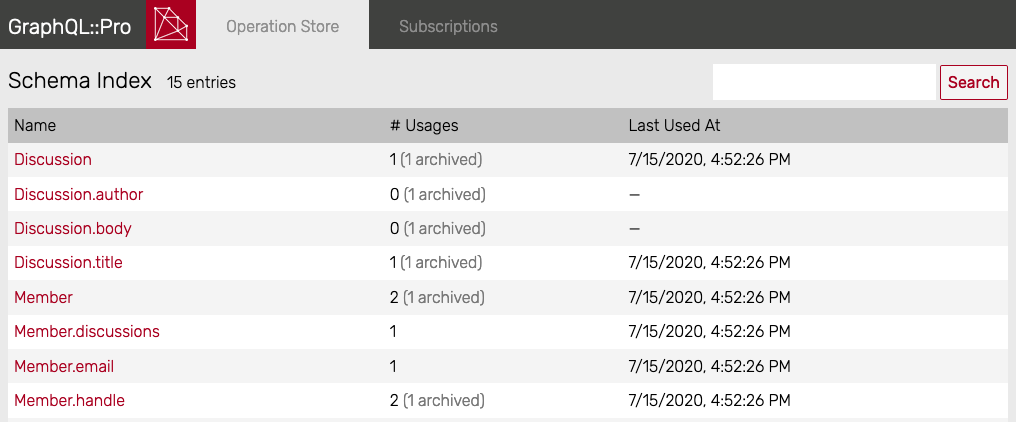 of
of GraphQL usage with persisted queries
How it Works
OperationStore uses tables in your database to store normalized, deduplicated GraphQL strings. The database is immutable: new operations may be added, but operations are never modified or removed.
When clients sync their operations, requests are authenticated, then the incoming GraphQL is validated, normalized, and added to the database if needed. Also, the incoming client name is associated with all operations in the payload.
Then, at runtime, clients send an operation ID to run a persisted query. It looks like this in params:
params[:operationId] # => "relay-app-v1/810c97f6631001..."
OperationStore uses this to fetch the matching operation from the database. From there, the query is evaluated normally.
Getting Started
See the getting started guide to add OperationStore to your app.