Client Workflow
To use persisted queries with your client application, you must:
-
Set up
OperationStore, as described in Getting Started -
Add the client to the system
-
Sync operations from the client to the server
-
Send
params[:operationId]from the client app
This documentation also touches on graphql-ruby-client sync, a JavaScript client library for using OperationStore.
Add a Client
Clients are registered via the dashboard:
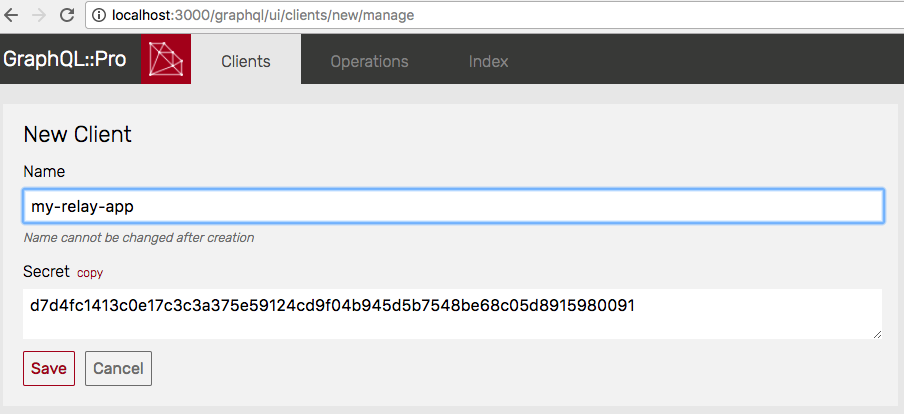 a Client for Persisted Queries
A default secret is provided for you, but you can also enter your own. The secret is used for HMAC authentication.
(Are you interested in a Ruby API for this? Please open an issue or email support@graphql.pro.)
Syncing
Once a client is registered, it can push queries to the server via the Sync API.
The easiest way to sync is with graphql-ruby-client sync, a command-line tool written in JavaScript (Sync Guide)
In short, it:
-
Finds
GraphQLqueries from.graphqlfiles orrelay-compileroutput in the provided--path -
Adds an Authentication header based on the provided
--clientand--secret -
Sends the operations to the provided
--url -
Generates a JavaScript module into the provided
--outfile
For example:
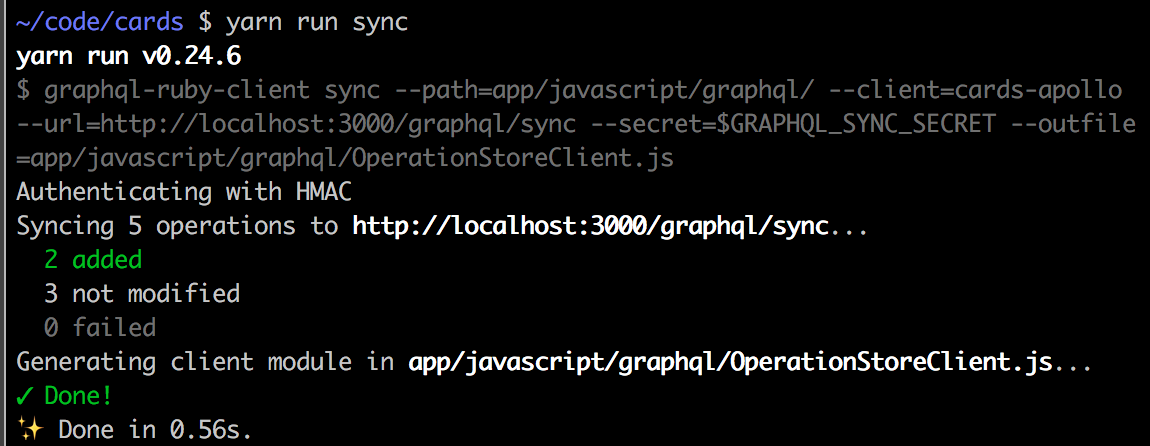 client sync
For help syncing in another language, you can take inspiration from the JavaScript implementation, open an issue, or email support@graphql.pro.
Client Usage
See the Sync Guide for using OperationStore with Relay Modern, Apollo 1.x, Apollo Link, or plain JavaScript.
To run stored operations from another client, send a param called operationId which is composed of:
  {
   # ...
   operationId: "my-relay-app/ce79aa2784fc..."
   #            ^ client id  / ^ operation id
 }
The server will use those values to fetch an operation from the database.
Next Steps
Learn more about OperationStore‘s authentication or read some tips for server management.